Guest Operating System
Windows Security
Intermediate
✓ Completed
Windows 11 Security Hardening Lab
A hands-on cybersecurity lab focused on establishing a Windows 11 security baseline, reducing the attack surface, applying system hardening techniques, and verifying changes using PowerShell and native Windows security tools.
Project Information
Category
Windows Security
Difficulty
Intermediate
Status
✓ Completed
Platform
Windows 11 Evaluation
Hypervisor
Oracle VirtualBox
Primary Tool
PowerShell
Environment
Virtual Machine
Focus
System Hardening
Lab Environment
The project was completed in a virtualized Windows 11 lab environment using native Windows administration and security tools.
Hypervisor
Oracle VirtualBox
Administration
PowerShell
Endpoint Protection
Microsoft Defender
Network Security
Windows Defender Firewall
Security Configuration
Local Security Policy
Project Overview
This project demonstrates how security settings can be reviewed, documented, and improved on a Windows 11 system. A virtual machine was used to create a safe environment for testing configuration changes.
Objectives
Establish a Baseline
Review baseline Windows security settings and define the controls targeted for hardening.
Reduce the Attack Surface
Disable unnecessary legacy features and review services that may create security risks.
Improve Protection
Verify firewall, antivirus, account, update, and security-policy settings.
Document Evidence
Capture implementation and verification evidence showing the hardened security controls and their verified states.
Initial Assessment
Baseline Assessment
Before applying hardening controls, I reviewed the Windows 11 security configuration and identified the settings that would be evaluated and hardened throughout the lab.
Microsoft Defender
Reviewed endpoint protection settings including antivirus, real-time protection, scanning, reputation protection, and security intelligence.
Windows Firewall
Reviewed Domain, Private, and Public firewall profiles along with their default inbound and outbound behavior.
SMB & Network Security
Evaluated SMBv1, SMB signing, insecure guest access, and other network-related settings targeted for hardening.
Remote Management
Reviewed remote-management exposure, including Remote Registry and Windows Remote Management.
Logging & PowerShell
Reviewed security logging requirements and PowerShell auditing controls such as Script Block Logging and Module Logging.
Credential Protection
Evaluated credential-related protections including LAN Manager hash storage, WDigest credential caching, and LSA protection.
Removable Media
Reviewed AutoPlay and AutoRun behavior to reduce risks associated with removable and non-volume devices.
Local Security Policy
Reviewed applicable local security and Group Policy settings before implementing the target configuration.
Evidence note:
The lab included a baseline security review, but the repository does not claim to contain a complete screenshot set of the original pre-hardening configuration. The evidence presented in this case study focuses on implemented controls and their verified hardened states.
Hardening Process
I applied hardening controls across multiple Windows security areas, verifying each change through PowerShell or the appropriate administrative interface before moving to the next control.
Build and Review the Lab
Created an isolated Windows 11 virtual machine in Oracle VirtualBox and reviewed the initial security configuration.
Harden Endpoint Protection
Reviewed and configured Microsoft Defender protections, updated security intelligence, and completed a quick scan.
Harden Firewall and Network Services
Verified firewall profiles, disabled SMBv1, required SMB signing, disabled insecure guest logons, and reduced unnecessary remote-management exposure.
Improve Logging and Auditing
Enabled PowerShell Script Block Logging and Module Logging to improve visibility into administrative and security events.
Strengthen Credential and Device Security
Applied credential protections, verified LSA protection, disabled WDigest plaintext credential caching, and hardened AutoPlay and AutoRun behavior.
Verify and Preserve the Hardened State
Validated the final configuration, exported Group Policy and Local Security Policy reports, captured verification evidence, and created a recovery snapshot.
Verification Evidence
After implementing the hardening controls, I validated the final configuration using PowerShell and native Windows administrative tools. The repository contains implementation evidence along with dedicated final verification procedures.
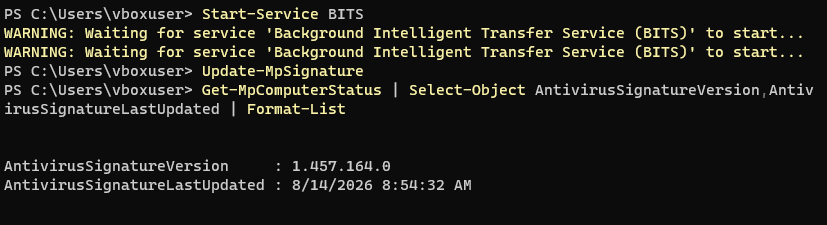
Microsoft Defender
Verified antivirus, real-time protection, security intelligence, and endpoint protection status.
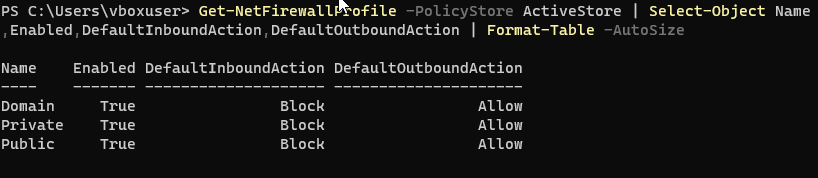
Windows Firewall
Verified that the Domain, Private, and Public firewall profiles were enabled with the expected default behavior.
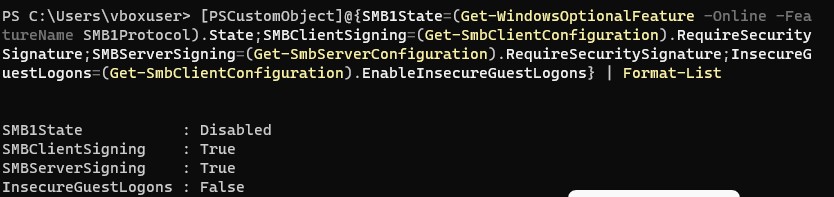
SMB Security
Verified that SMBv1 was disabled, SMB signing was required, and insecure guest access was disabled.

Remote Services
Verified that Remote Registry and WinRM were disabled and stopped to reduce unnecessary remote-management exposure.
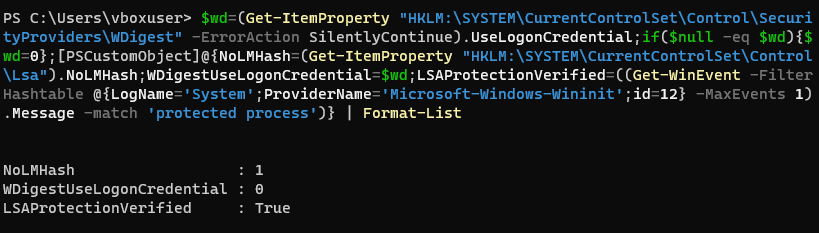
Credential Protection
Verified protections for LAN Manager hashes, WDigest credential caching, and LSA.
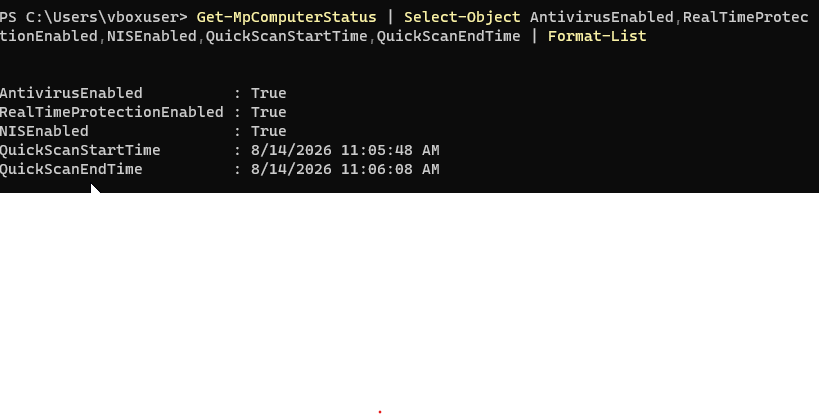
Final Security Scan
Updated Microsoft Defender security intelligence and verified that the final Defender quick scan completed successfully.

No Threat Detections
Verified that Microsoft Defender reported no threat detections during the final validation of the hardened Windows 11 system.
Reports & Technical Artifacts
In addition to screenshot evidence, I exported Windows policy configuration reports to preserve the hardened system state and provide technical artifacts for review.
Group Policy Results
Exported Group Policy results showing the applied Windows configuration and policy state.
View Group Policy Report →Local Security Policy Export
Exported Local Security Policy configuration for technical validation and documentation of the hardened system.
View Security Policy Export →Outcome & Lessons Learned
This project resulted in a hardened Windows 11 lab system with validated security controls, repeatable verification commands, exported policy reports, and preserved recovery evidence.
Validation Matters
I learned that applying a security control is only part of the process. Each change should be verified through PowerShell or the appropriate administrative interface.
Reduce the Attack Surface
Disabling unnecessary legacy protocols, remote services, and insecure features can significantly reduce exposure on a Windows endpoint.
Documentation Is Critical
Screenshots, exported reports, validation commands, and recovery snapshots made the hardening process repeatable and easier to review.
Security Requires Context
I learned that hardening controls should be evaluated according to the environment rather than applied blindly, especially for services used in enterprise management.
Skills Demonstrated
This project demonstrates practical Windows endpoint security, PowerShell validation, policy configuration, evidence collection, and technical documentation skills.